
Behind the scenes: OpenFold3 Design Decisions
Introduction - Improving usability

Written By: Jennifer Wei, PhD
OpenFold3 aims to provide a fully open-source platform for biological structure prediction. Our vision is not just to build a foundational model based upon AlphaFold3 for predicting co-folded structures, but establish an open-source foundational library for biological structure machine learning with components that could be reused for other models.
The original OpenFold (OpenFold2) repository was a careful reproduction of AlphaFold2 in Pytorch. Many design decisions were based directly on the AlphaFold2 codebase. The OpenFold2 repository would later become the workhorse for many of the current cofolding prediction models, providing sequence alignments and distillation structures to train the models produced by Boltz, Protenix, Chai-1, and our own OpenFold3 models.
However, as we worked with OpenFold2, we found some limitations in the user experience. OpenFold was a challenge to install, with no simple start up commands to test the installation. Furthermore, users needed to run sequence alignments locally, requiring additional computational overhead and technical expertise. Changing configuration settings between experiments required manual edits to the code and was difficult to trace between runs.
A primary goal of the OpenFold Consortium is to improve user experience and usability of the biological machine learning software that we support. We interpreted these issues in the original OpenFold as a to-do list for OpenFold3, offering us the opportunity to improve the usage and development experience.
This blog post focuses on some of these design decisions, primarily focused on the inference predictions.
Streamline the installation and set up of OpenFold3
Simple one-line command to run predictions
High customizability of configurations with smart defaults
Future blog posts may take deeper dives into the data pipeline and model organization, which we aimed to construct as reusable building blocks.
Easy Installation and Guided Setup
One focus for OpenFold3 was to simplify the setup initial experience. In particular, we wanted to reduce the barriers required for a user to make their first predictions. See below for a comparison of the setup procedures for the two software packages; the OpenFold3 setup has now been reduced to two lines.
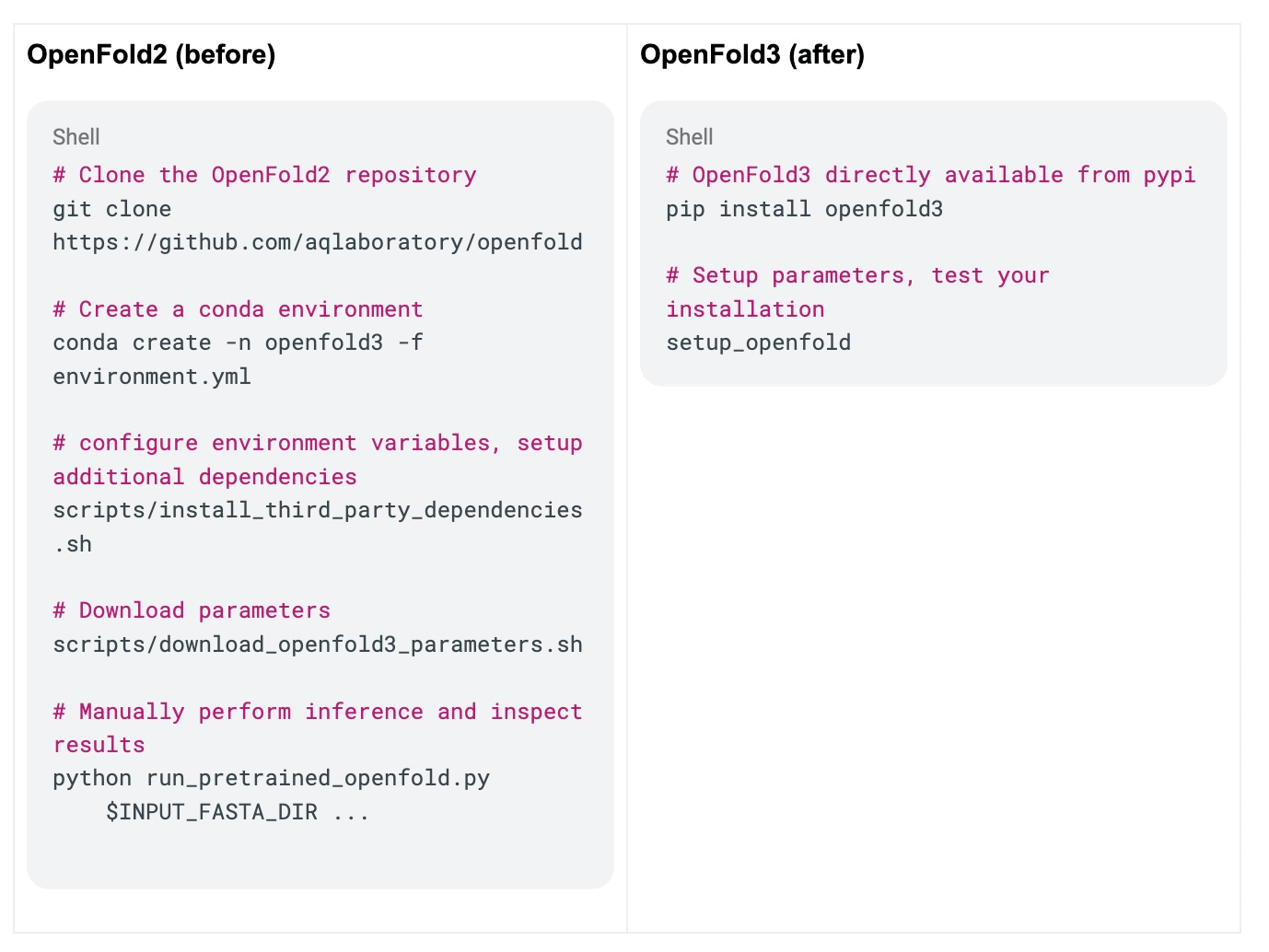
First, to enable easy installation, we wanted to distribute OpenFold3 as a package available through common registries. We worked with the OMSF Ecosystem Infrastructure team to make OpenFold3 available on pypi. With the contributions of Santiago Villalba and Tim Adler (Bayer), we will further modernize our environment development. We now support pixi as the basis for managing OpenFold3 dependencies, which enables support for seamlessly building AMD and soon, Apple Silicon. Stay tuned for a future blog post that will focus on pixi development.
To streamline the rest of the setup, we created a single command, setup_openfold. This command wraps a small python script, which guides the user through parameter selection and download location. To verify their installation was set up properly, the process prompts the user to run a full inference workflow on some pre-built examples. This integration test validates installation and inference workflow and ensures use of a common example to assist us in debugging errors in the users’ experience.
Simplifying Sequence Alignments with ColabFold
The best predictions with OpenFold2 require the user to have multiple sequence alignments (MSAs) for their query. Computing sequence alignments introduces additional technical complexity.
One such challenge is the choice of which libraries and databases to use for computing the sequence alignments. OpenFold2 was configured to use jackhmmer and hhblits to perform sequence alignment against the databases used in AlphaFold2: BFD, Uniprot90, PDB70, and Mgnify database. The combined size of these databases was roughly 2TB, which could take up to 2 days to download; it is possible to use a subselection of these datasets, but care must be taken to ensure that the database is still representative enough of the queries to make good MSAs.
With OpenFold3, we wanted to offer a strong default option for sequence alignments that would not require any expertise or additional storage from the user. The base prediction option in OpenFold3 leverages the ColabFold server to compute MSAs. ColabFold handles all of the database management and alignment binaries; we provide wrappers to parse the ColabFold sequence alignments into the per-chain alignments required by OpenFold3.
For users who prefer to perform alignments themselves, we also provide scripts and documentation to perform sequence alignments with jackhmmer or hhblits, following the protocol we used to construct the training set. In particular, the user now has flexibility to choose the sequence databases that they would like to use to perform sequence alignments, and can even use their own custom databases. More details can be found in our MSA documentation here. This arrangement means that an average user with a simple use case can use OpenFold3 out of the box, with no additional setup required for MSAs, but an advanced user still has all the flexibility they need with local control of this step.
Maximum customizability, smart default settings
In OpenFold2, most configuration options are not accessible through the command line. To make changes to most settings, such as loss weighting, one would need to make a direct edit to the 1,000 line config module. This made changes difficult to track and to reproduce across users/systems.
With OpenFold3, we strove to make the configuration settings easier to edit and reproduce between experiments. The goal was to provide the user an easy way to begin running predictions, but also provide an organized and reproducible way for more advanced settings.
The simplest OpenFold3 command is:
run_openfold predict --query-json=my_query.jsonwhere the only required input is the query json that describes the structure to be predicted. No other command line flags are needed. In this use case, OpenFold3 will attempt to search for model weights in a series of default locations; if no weights were downloaded through running setup_openfold previously, the command guides the user to download the weights.
The rest of the configuration settings can be edited with extra flags and configuration files, in the following priority:
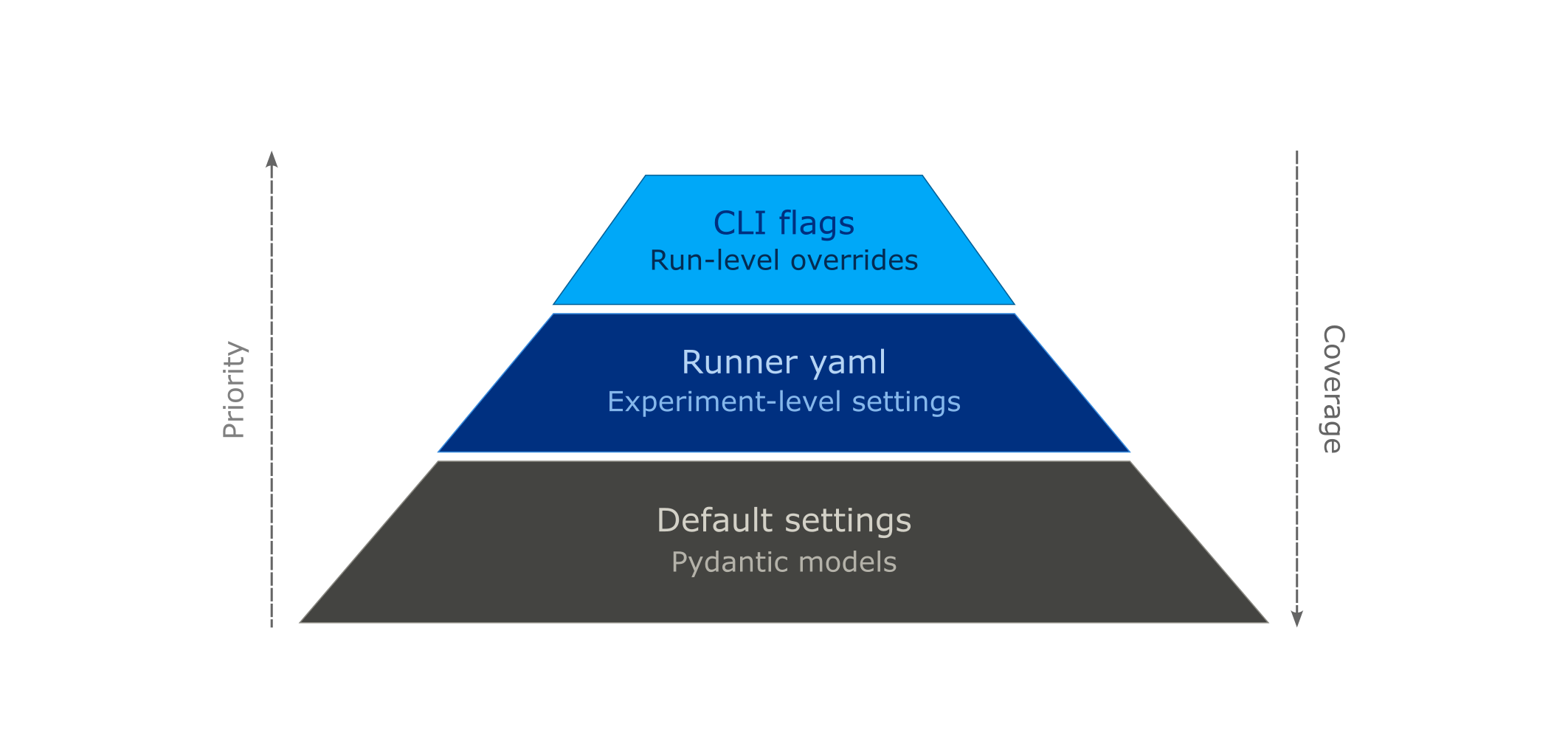
At the base, we define groups of configurations and their default settings using the Pydantic library. Such groups of configurations are referred to as a Pydantic model. The default settings can be overwritten by passing in a runner.yaml (second level). Here is a specific example of a Pydantic model configuration, in this case the Output Writing Settings, and how to overwrite the defaults in the runner.yaml.
class OutputWritingSettings(pydantic.BaseModel):
    """File formats to use for writing inference prediction results.

    Used by OF3OutputWriter in openfold3.core.runners.writer
    """
    structure_format: Literal["pdb", "cif", "cif.gz"] = "cif"
    full_confidence_output_format: Literal["json", "npz"] = "json"
    full_confidence_output_dtype: Literal["float16", "float32"] = "float16"
    write_features: bool = False
    write_latent_outputs: bool = False
    write_full_confidence_scores: bool = True
# Sample yaml block that updates Output Writing Settings

output_writing_settings:
  structure_format: pdb  # Change to PDB output
  write_latent_outputs: True  # Write latent representation
For experiment settings that might be changed often, we expose a few settings as command line arguments (top level). Some examples of settings with priority access include number of diffusion samples and path to model weights. The full list of settings available from the command line may be found here.
Using Pydantic to organize parameters offered several organizational benefits:
From looking at the Pydantic models, it is easy to determine which configuration options are supported. For example, by inspecting the OutputWriterSettings model above, we can easily see the available options to select the structure output type (PDB / mmcif) and configure the confidence and latent representation outputs.
For full reproducibility, every experiment saves a record of all configurations as an
experiment_config.json. This allows for human inspection of the settings even months after the experiment was performed.The Pydantic models for the input query format makes it easy to extend to downstream applications. In particular, we now provide a simple webtool to construct input jsons, which leverages the definitions provided by our input format models.
One area that could be improved with our use of Pydantic is the placement of the Pydantic models themselves. In particular, I felt a tension between whether to place the Pydantic model all in the same module / folder, or whether to place them close to the object that would consume the settings. Our current solution is mixed: the majority of the Pydantic models are placed in a validator.py module, but a few models, such as the TemplatePreprocessorSettings are placed next to the TemplatePreprocessor itself. We keep a centralized reference of configuration settings here, but a more streamlined way of organizing configurations could help with discoverability of settings.
Where do we go next
OpenFold3 took major steps towards improving the user experience over its predecessor. In particular, the activation energy required to start making basic predictions in OpenFold3 has been significantly reduced with better installation support and the default option using ColabFold to compute sequence alignments. Configuration settings are much more tunable and easy to reproduce and record between experiments and users.
We look forward to expanding the capabilities of the OpenFold3 library to support fine tuning and prediction on more modalities. We aim to support more extensions such as the Sandbox AQ affinity model. Future blog posts will cover more about the design of the library components, and how to build additional models with the core components.
Acknowledgements
Thank you to the AlQuraishi Lab at Columbia University, especially Mohammed AlQuraishi, Christina Floristean, Lukas Jarosch, and Gergo Nikolenyi for their help with building and designing the OpenFold3 repository. Thank you to Steven Lewis, David Swenson, and Ethan Holz for many productive technical conversations.